Corporate Flyer with Multiple Color: A Flexible Design Asset
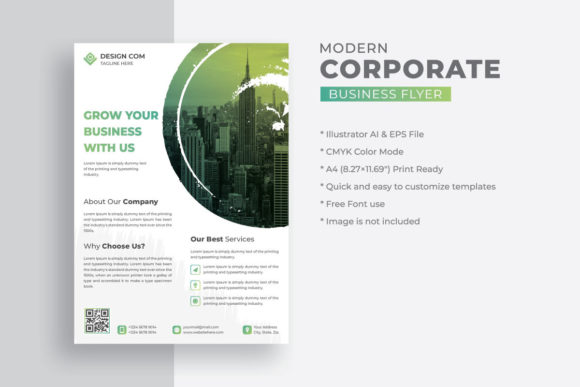
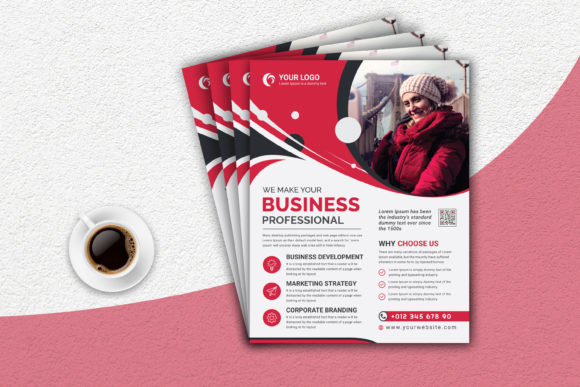
Let's be honest, finding a single template that adapts to different brand palettes without looking like a generic afterthought is a genuine challenge. The Corporate Flyer with Multiple Color template cuts through that noise. It isn't just a static file; it's a foundational design asset built for real-world versatility. Right out of the box, you get three distinct color variations—professional blue, energetic red, and optimistic yellow—each on a well-organized, fully editable canvas. This means you're not starting from zero; you're starting from a strategically designed foundation that respects your time and your brand's unique needs.
Understanding Its Visual DNA and Practical Appeal
At its core, this template embodies clean, modern typography and a structured layout that prioritizes clarity. The design personality is confident and approachable, striking a balance between corporate professionalism and creative accessibility. It doesn't scream for attention with trendy gimmicks; instead, it earns trust through thoughtful composition, ample white space, and a logical flow that guides the reader's eye from headline to call to action. The overall appeal is its inherent adaptability. The blue variation feels trustworthy and stable, ideal for finance, tech, or consulting. The red injects passion and urgency, perfect for events, sales, or bold branding. The yellow brings warmth and creativity, suited for startups, education, or community-focused initiatives. This isn't a one-trick pony; it's a toolkit.
The practical specifications are where the professionalism truly shows. At 8.5x11 inches with a .25 bleed, it's a standard letter size that's print-ready for most office and commercial printers. The 300 DPI CMYK color mode ensures what you see on screen translates accurately to crisp, vibrant print. The inclusion of both AI (CS6) and EPS (10) files gives you flexibility whether you're working in Adobe Illustrator or other vector-based software. The well-organized layers are a lifesaver, allowing you to easily isolate and edit text blocks, image placeholders, or graphic elements without digging through a chaotic file structure.
Where This Template Truly Shines: From Digital to Print
Think of the Corporate Flyer with Multiple Color as a chameleon for your communication needs. Its strengths are most apparent in projects where clarity and brand consistency are paramount. For small business owners and entrepreneurs, it's a quick-turn solution for creating professional handouts for networking events, product sheets for trade shows, or service menus for client meetings. Marketers and content creators can leverage it to produce cohesive campaign materials—like webinar announcements, lead magnet summaries, or social media kit inserts—that maintain visual integrity across platforms.
For designers and publishers, it serves as an excellent starting point for editorial design projects, such as magazine inserts, annual report summaries, or nonprofit appeal letters. Its structured layout is fantastic for presenting data or timelines clearly. In the realm of packaging design, think of it as a companion piece—a detailed brochure that accompanies a physical product, explaining features or telling the brand story. The key is its role as a commercial font-free asset. Because it uses free fonts, you sidestep complex licensing issues for both personal and commercial projects, which is a significant advantage for bloggers, hobbyists, and startups operating on tight budgets.
Integrating It Into Your Brand Workflow: Practical Guidance
Adopting any new design asset requires a bit of strategy. First, evaluate the project fit. Is the goal to inform, persuade, or announce? The template's clean hierarchy works best for informational or moderately persuasive content. If you need something ultra-playful or highly artistic, you might need to modify it more extensively. Next, test font pairings. While the template includes fonts, you may want to swap them to match your existing brand identity. Pair the template's likely sans serif font headings with a complementary serif font for body text to create visual interest and improve readability for longer blocks of copy.
Reviewing the included styles is crucial. Don't just pick your favorite color. Consider your audience and context. A financial advisor's quarterly update might demand the blue version's calm authority, while a summer workshop promotion could thrive with the yellow's vibrancy. Readability considerations are paramount. Ensure your custom text has sufficient contrast against the background elements and that the font size remains legible, especially for body copy that will be printed. Finally, while the fonts are free, always double-check the source of any images you plan to use. The template notes that images are not included, so you'll need to source high-resolution, commercially licensed photos or illustrations to complete the design without legal hiccups.
This template is more than a pre-made layout; it's a premium font-free solution that empowers you to produce polished, on-brand collateral efficiently. By understanding its inherent strengths—its color flexibility, print-ready specs, and editable structure—you can integrate it seamlessly into your creative process, ensuring your communications always look professional, consistent, and engaging. It’s a practical tool for anyone who values both aesthetics and efficiency in their visual storytelling.